Everything your ride needs
MotoLens makes it easy to capture every trip — from the first notification to the final clip.
Trip Detection
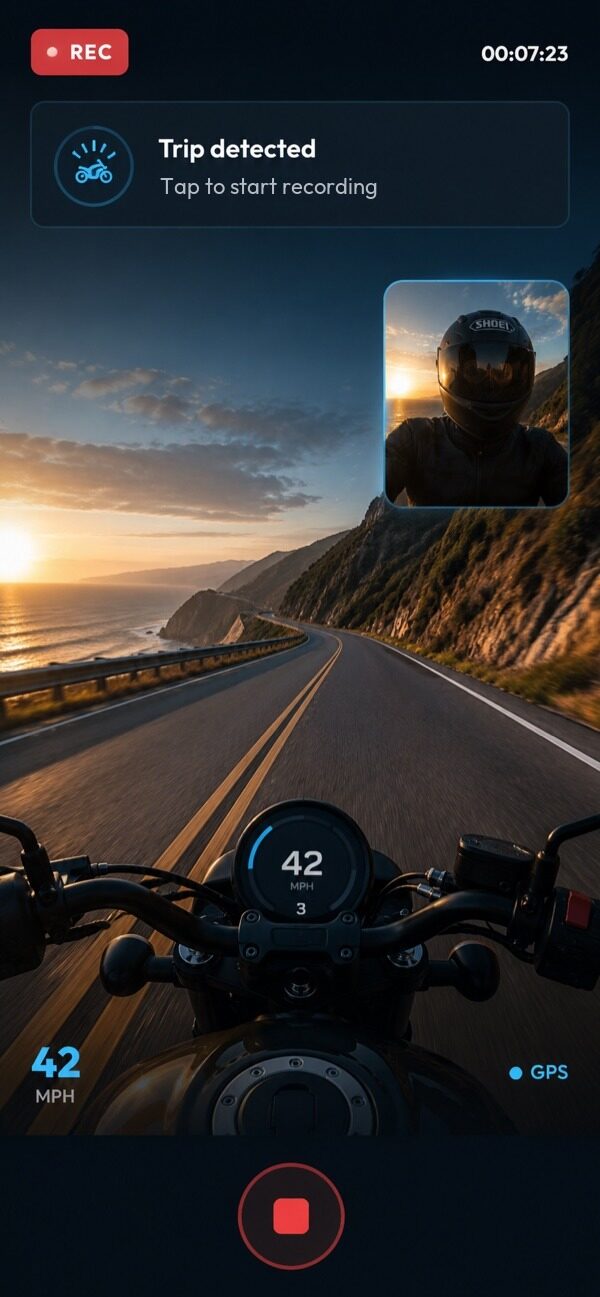
MotoLens detects when you've started a trip and sends a notification. Start recording with one tap — or ask Siri if your hands are on the wheel.
Background Recording
Once you start recording, MotoLens keeps going in the background. Switch to maps, music, or any other app — your clip keeps running.
GPS Route Tracking
Free for all users. Full route, speed, and distance logged every trip — ready to replay anytime.
Trip Library
Browse every clip by date, distance, and duration. Play back or share with one tap.
Community Leaderboard
See how your distance compares to other MotoLens riders globally. A little healthy competition.
MotoLens Pro
4K video export, no storage cap, and automatic clip compression. Upgrade when you're ready.
Frequently Asked Questions
Everything you need to know about MotoLens.
Does MotoLens drain my battery?
Trip detection is lightweight — it uses the motion coprocessor, a dedicated chip that runs independently of the main CPU and has minimal battery impact. Active recording uses more power, as any camera app would, but idle monitoring between trips is not a concern.
Does recording start automatically?
No — MotoLens detects when you're on a trip and sends you a notification. You start recording with one tap, or hands-free via Siri if you can't reach your phone. This keeps you in control and avoids recording at times you don't want.
What's included in the free version?
The free version includes trip detection notifications, background recording, GPS route tracking, your full trip library, and access to the community leaderboard. Recording is subject to a rolling device storage limit.
What does MotoLens Pro add?
MotoLens Pro unlocks 4K video export (free is capped at 1080p), removes the storage limit so your entire trip history is preserved, and adds automatic clip compression to save space without losing quality.
Does it work for cars and motorcycles?
Yes. MotoLens works for any vehicle — cars, motorcycles, scooters, trucks. Trip detection adapts to your driving pattern regardless of vehicle type.